
Subscribing to HamQSO Pro
Open the subscription page, choose the yearly, monthly or Lifetime plan, try Pro free and see what happens after paying, in the app and on the web.
ProUpdated for HamQSO 0.1.19
On this page
You subscribe to HamQSO Pro from the subscription page (the paywall): choose a plan, try Pro free if the store offers you a trial and, as soon as the payment goes through, you are back to what you were doing with Pro already active. One subscription unlocks everything: alerts, radio, coverage tests and eQSL. What Pro includes is explained in What HamQSO Pro includes.
Opening the subscription page
The page always opens with a tap, from any place where a feature needs Pro:
- the Pro card in the Profile (Try Pro, N days free or Discover Pro), see The Profile;
- a feature with the Pro mark, or See Pro in the sheets that explain a Pro feature;
- a second alert, a Pro criterion in the alert editor or the When you get spotted switch;
- connecting the radio over CAT;
- a new coverage test after the free one, or saving or sharing a test;
- the cards received from eQSL.cc that are not in your log, the Shop, the card editor and the Pro models of eQSL HamQSO;
- callsign protection;
- a
hamqso.app/app/prolink (see below).
Pro features are never hidden from users without Pro: you see them with the Pro mark and a tap opens this page.
When it opens by itself
The app opens the subscription page by itself at one moment only: when you close the result of your first free coverage test. It happens only if you do not have Pro and only if you have not already seen the subscription page in that session (since the app started), even if you opened it yourself. Close it with the X and it does not come back by itself in the same session. Every other time it opens only when you tap something.
What you see on the phone
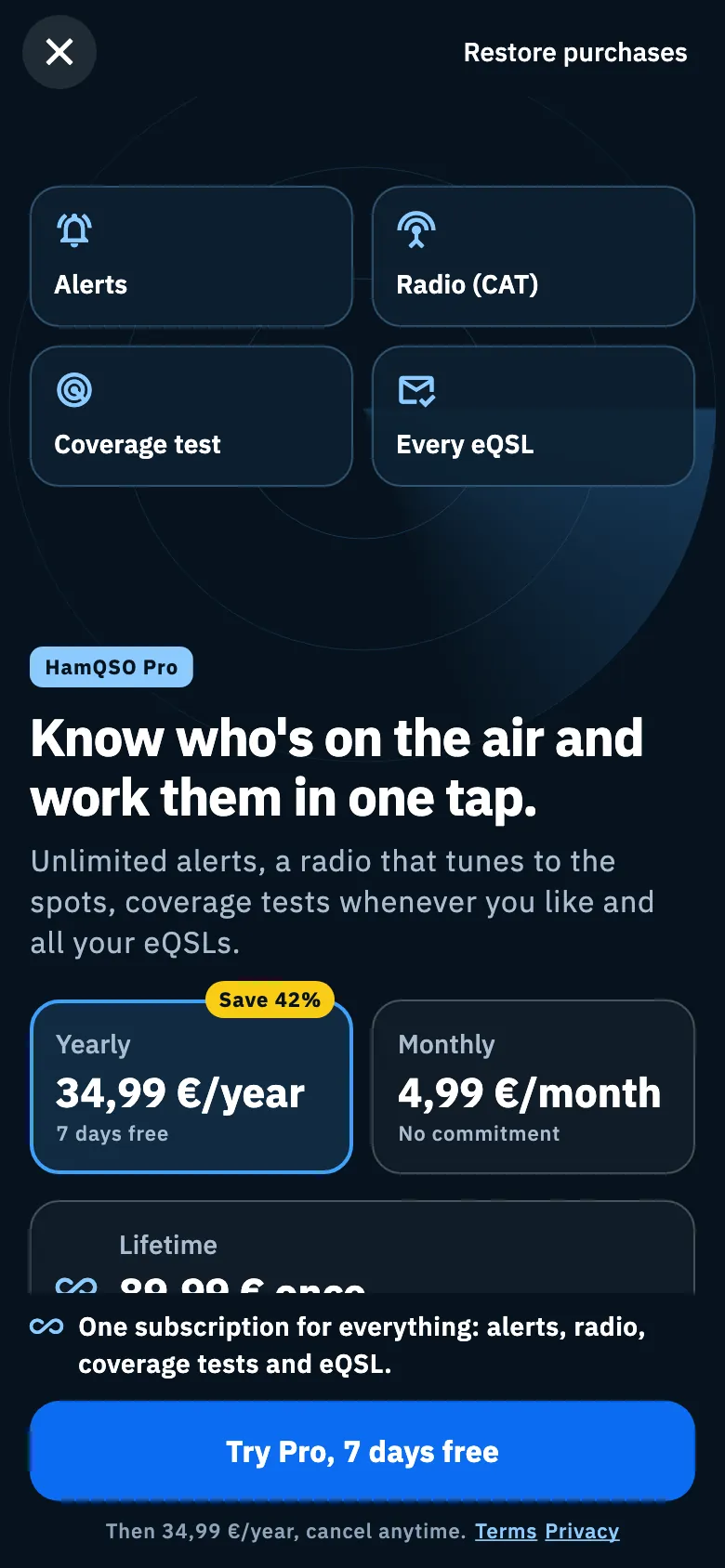
On the phone the page slides up from the bottom and fills the screen, on a dark background:
- At the top left the X closes without buying; at the top right is Restore purchases.
- Below, an animated picture shows the feature you came from, over a radar (for the coverage test, over a globe): see the next section. With the system's "Reduce motion" on, the animations stay still.
- The HamQSO Pro label, the title and the sentence of the feature.
- The plan cards.
- The Everything included in Pro list, with the line of your feature highlighted.
- At the bottom, always in sight, the line One subscription for everything: alerts, radio, coverage tests and eQSL. and the large button to subscribe. Under the button are the plan's note and the Terms and Privacy links.
On a tablet (a window at least 840 points wide) the page has two columns: the picture on the left, title, plans and list on the right; the one-subscription line and the button stay at the bottom.
A different page for each feature
Plans, prices and Restore purchases are always the same; the picture, title, sentence and button text change with the place you open the page from. When the app has data of yours it uses it (your radio, your alert, your test, your eQSLs), otherwise it shows the version without names.
| Where you come from | Title | Button with a free trial | Button without a trial |
|---|---|---|---|
| Alerts | Know who is on the air, before everyone else. | Create your alert, N days free | Subscribe and create your alert |
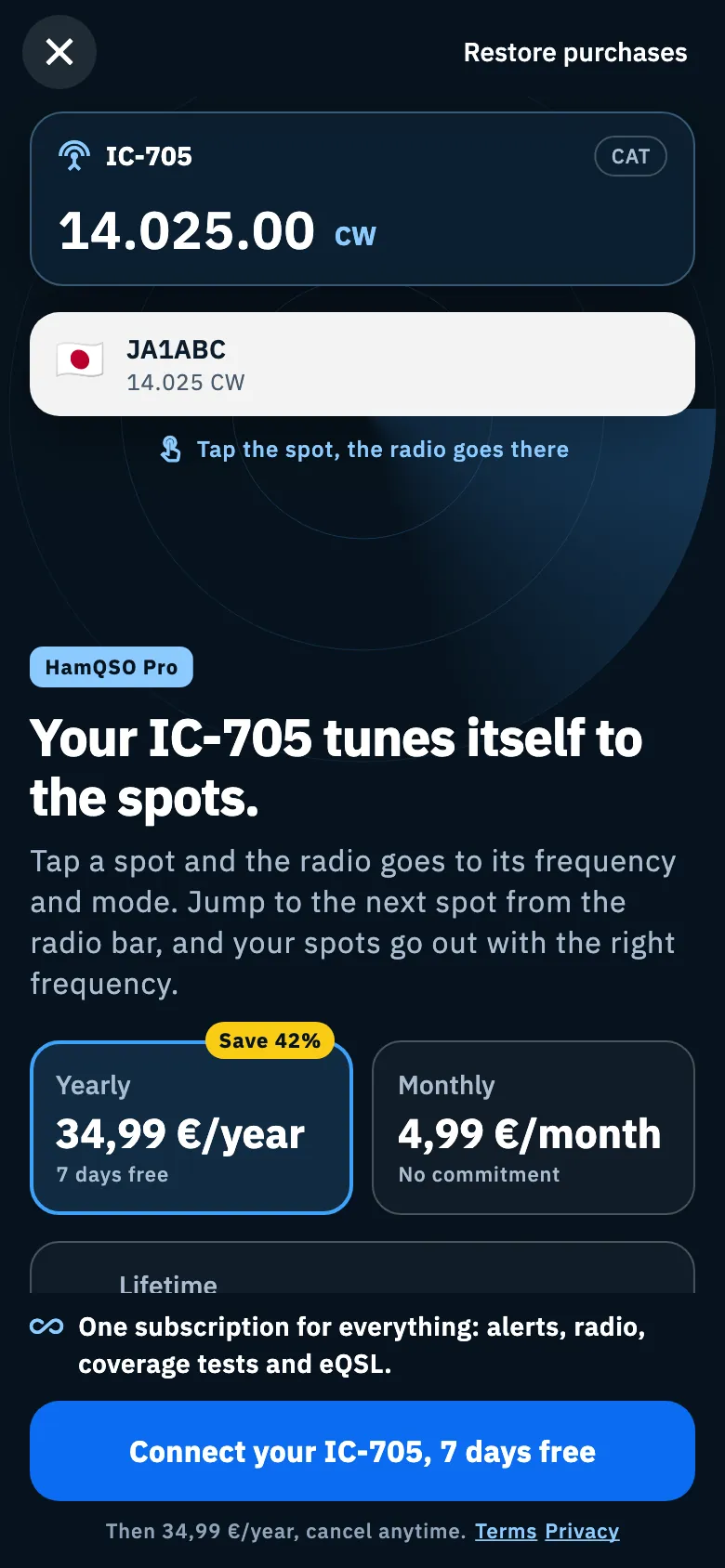
| Radio | Your IC-705 tunes itself to the spots. (with your model) or Your radio tunes itself to the spots. | Connect your IC-705, N days free or Connect your radio, N days free | Subscribe and connect your IC-705 or Subscribe and connect your radio |
| Coverage test | See who hears you, whenever you like. | Run your next test, N days free; from save or share, Save the test, N days free or Share the test, N days free | Subscribe and test again, Subscribe and save the test, Subscribe and share the test |
| eQSL | N eQSLs you received aren't in your log. or, without a number, All your eQSLs, even without a QSO in your log. | See your N eQSLs, N days free or See all your eQSLs, N days free | Subscribe and see your N eQSLs or Subscribe and see all your eQSLs |
| Callsign protection | There is one notice on IU0XYZ. Was it you? (with more notices, There are N notices on IU0XYZ. Was it you?) or, with no notices, Protect IU0XYZ with Pro | See the notice, N days free (See the notices, N days free) or Protect IU0XYZ, N days free | Subscribe and see the notice (Subscribe and see the notices) or Subscribe and protect IU0XYZ |
| Profile, link, HamQRG offer | Know who's on the air and work them in one tap. | Try Pro, N days free | Subscribe to HamQSO Pro |
What the picture shows:
- Alerts: the criteria of an alert (Notify me for, Tap a criterion) and the sample notifications they produce. Tap a chip to switch a criterion off or on and see what changes; if you switch them all off you read No criteria on: tap a chip to switch it back on. If your free alert has already found stations today, the sentence says so with its name.
- Radio: the radio following a spot (Tap the spot, the radio goes there), with your radio's model if you chose one.
- Coverage test: the globe of the test you just ran, with how many skimmers heard you and the farthest one; without a test of yours, an example (Every dot is a skimmer that heard you).
- eQSL: your received cards, blurred.
- Callsign protection: the latest notice on your callsign with who, from where, band and mode and proofs blurred (The details are shown with Pro). The data under the blur is made up: the real data stays on the server until you have Pro. Under the sentence are three benefits and the sources checked, We check spots, skimmers and PSKReporter. With no notices on your callsign there is no picture; with no callsign in your profile the page uses the generic texts.
- Generic: four tiles, Alerts, Radio (CAT), Coverage test and Every eQSL.
Choosing a plan and trying Pro free
Plans and prices are the store's, in your currency. A plan the store does not sell does not appear.
| Plan | Price | What the card says |
|---|---|---|
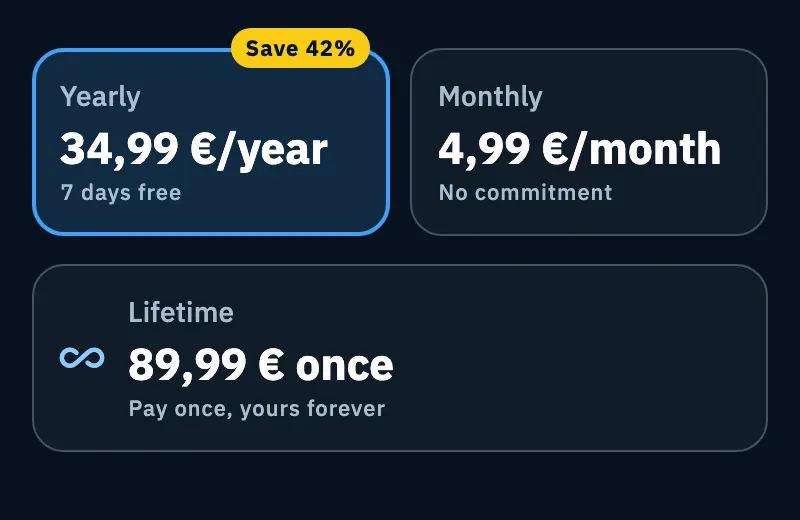
| Yearly (already chosen) | price**/year** | N days free if the store offers you the trial, otherwise the monthly price; the Save N% badge compared with twelve months of the monthly plan |
| Monthly | price**/month** | No commitment |
| Lifetime | price once | Pay once, yours forever |
On the phone Yearly and Monthly sit side by side and Lifetime is below, full width.
- Tap the card of the plan you want.
- The button and the note below follow the plan:
- with a free trial the button ends with N days free and the note says Then 34,99 €/year, cancel anytime.;
- without a trial the note says Renews automatically, cancel anytime.;
- with Lifetime the button is Unlock Pro forever and the note One-time payment, no renewal.
- Tap the button: the App Store or Google Play payment opens, with your store account.
- Confirm in the store.
The store decides the trial length for your account: if it offers none, the button says Subscribe …. The yearly and monthly plans renew by themselves until you cancel them in the store: see Managing your subscription.
After the payment
- Bought: the page closes by itself and you are back where you were, with Pro active. If you started from a Pro feature, the app picks it up again: for example, from the coverage test the new test starts.
- Cancelled in the store: the page stays open, no message and no charge.
- Failed: the message "Purchase failed. You have not been charged." appears.
- Paid but Pro not active yet: while the app waits for the store to confirm Pro, the button shows a spinner. The app checks again every 4 seconds, for 20 seconds. If Pro has not arrived after 20 seconds, the spinner goes away and the page stays open, with no message. As soon as the store confirms, Pro turns on by itself and, if the page is still open, it closes.
While the payment runs the button shows a spinner and Restore purchases is disabled. If Pro arrives from outside while the page is open (for example an offer code redeemed in the App Store), the page closes by itself.
On the web
In the browser you pay for the subscription on the web and it stays on your HamQSO account: it also works in the phone app, with the same account. The web costs 10% less than the app stores.
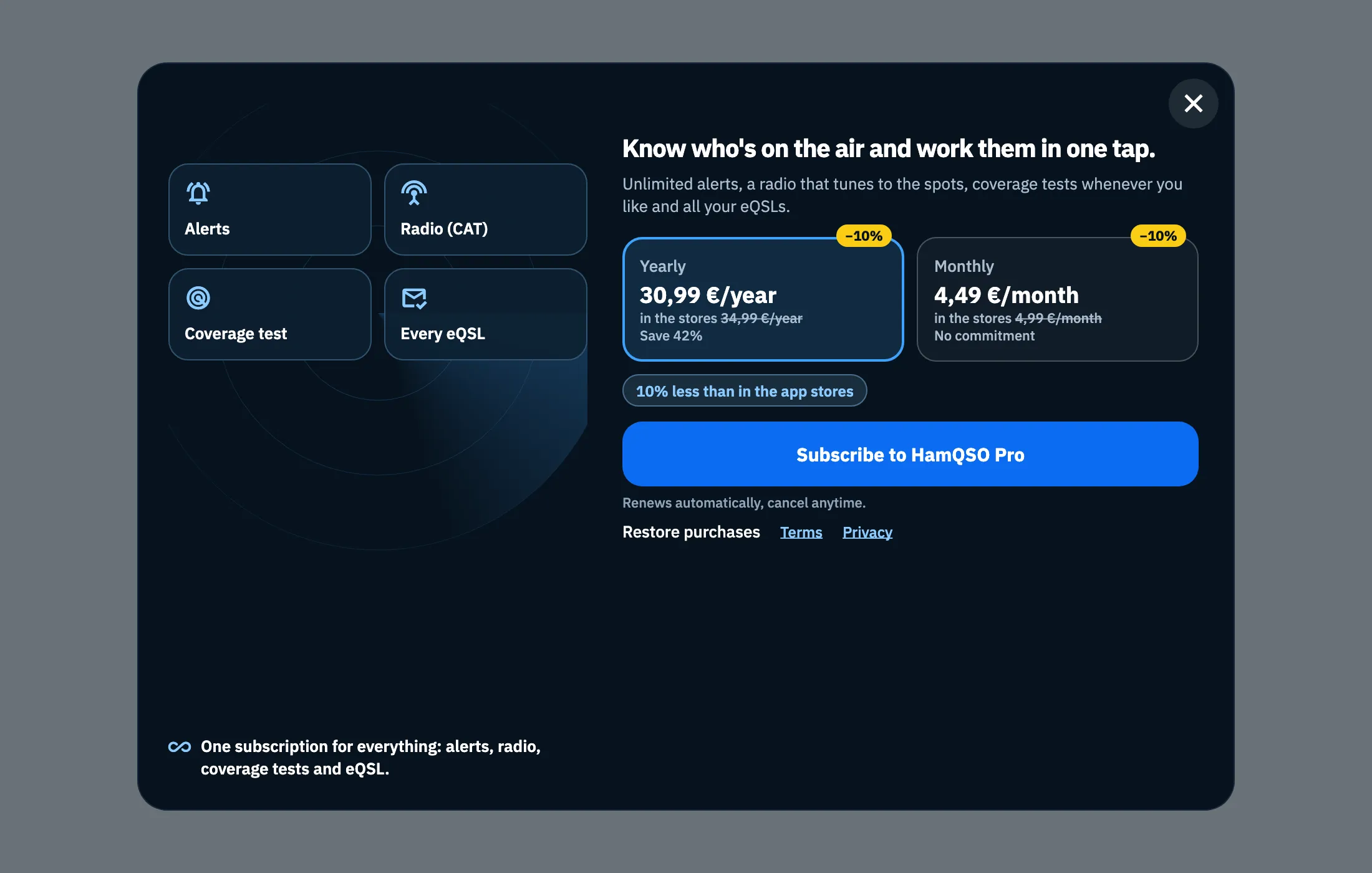
If the browser window is at least 920 × 640 points, the subscription page is a window over the blurred app, with the picture on the left and the steps on the right; smaller, it fills the whole page with the picture above.
- Sign in: if you use HamQSO without an account, before buying you see First, your account with Your subscription stays on your account, on your phone too. and Then you're back where you were. Sign in with Google, or with Continue with Apple when it is available. The plans show below, faded, but cannot be chosen. At the top the steps Sign in, Plan, Done tell you where you are; if you already have an account, the steps are not shown.
- Plan: choose a plan with a click or with ← and →, then click the button or press Enter. Each card shows −10% and in the stores with the store price struck through; under the cards is 10% less than in the app stores. The store price appears only when it is known.
- Complete the payment. The button says Payment in progress….
- Done: Pro active with Thank you, IU0XYZ. Pro also works in the phone app, with the same account. In the window over the app, the globe behind the window lights up. Click Get started, press any key or click anywhere; otherwise the window closes by itself after 4 seconds.
If the payment arrived but Pro is not active yet, you read Activating Pro… for up to 20 seconds, then Payment received. Pro will be active within a few minutes, even if you close this window. with Close.
From the keyboard Esc closes the window (the tooltip of the X button is "Close, Esc"), Tab stays inside the window and the first button of each step already has the focus. A click outside the window closes it, except during the payment. Restore purchases is under the button and, while it searches, says Looking for your purchases…: see Managing your subscription. All shortcuts are in Keyboard shortcuts.
Opening the page from a link
The address https://hamqso.app/app/pro opens the subscription page over the DX section, in the phone app (if installed) or in the browser. Add ?from= for the page of a feature:
| Link | Page |
|---|---|
…/app/pro?from=alerts | Alerts |
…/app/pro?from=rig | Radio |
…/app/pro?from=coverage | Coverage test |
…/app/pro?from=eqsl | eQSL |
…/app/pro?from=callsignProtection | Callsign protection |
no from, or any other value | Generic |
From a link the page has no data of yours, so it uses the texts without names. In the browser, if you opened the page by typing its address, closing it takes you to the home. If you already have Pro, in the browser the link shows your plan (HamQSO Pro is active); in the phone app you see the page with the plans. See Managing your subscription. Other addresses are in Links, addresses and web pages.
Troubleshooting
| Message | What to do |
|---|---|
| "Subscriptions are not available right now." | The store did not send the plans (even after waiting 10 seconds). Close the page and open it again later. |
| "Plans load when you are online. If you already have Pro, it stays active." | You are offline. Open the page again when you are online. |
| "I can't load the prices. Check your connection." (web) | Check your connection and click Retry. |
| "Purchase failed. You have not been charged." | Try again; on the web the button becomes Retry and the reason given by the payment provider may follow the message. |
| "Payment cancelled. You have not been charged." (web) | You closed the payment: choose the plan again whenever you like. |
| "Payment received. Pro will be active within a few minutes, even if you close this window." (web) | The payment arrived: you can close, Pro activates by itself. |
| "Sign-in failed. Try again." (web) | Signing in with Apple or Google did not work: try again. |
| "No subscription to restore on this store account." (app) | Restore purchases found no purchase on the store account: see Managing your subscription. |
| "No subscription on this account. Did you buy with another Apple or Google account? Sign out and sign in with that one." (web) | Sign out and sign in with the account you bought with. |
| "Restore failed. Try again shortly." | The store or the network did not answer: try again shortly. |